
Friday, March 23, 2012
Concept Mapping
This week we learned how to create a concept map with Bubbl.us Not coming from a teaching background, I had quite a bit of difficulty thinking of a concept, so I had to wing it. Here it is:


Thursday, March 15, 2012
Welcome back from Spring Break !
Welcome back from spring break! I fully intended to do a bunch of homework in advance of this week, I even started with reading a few things about Jing. Jing if you don't already know is a screen capture tool that allows you to capture video and audio from your computer desktop. Jing is useful for creating short how-to videos.
I used Jing to create a video of how to adjust the camera in the Persistance of Vision Raytracing (POV-Ray) scene language. POV-Ray is a freeware tool that allows you to create photo realistic 3-D images. Take a look at the Hall of Fame Gallery on the POV-Ray Website. To get POV-Ray, visit their website at http://www.povray.org/
I will post the video to my blog within a few days. It seems the hosting company http://www.screencast.com/ is experiencing technical difficulties with their servers. Therefore I'm out of luck for posting my video tonight. I attempted to post it to Photobucket, but they too were crashing. The video is 68MB in size, so it's fairly large, but not so much that It should create such a difficulty to view on a high-speed connection.
More to come, and thanks for watching.
James
*** UPDATE *** I've embedded the screencast code below, and I hope it works. I will apologize in advance, the code in POV-Ray is fairly small, so I used a large screen capture size. Unfortunately this screen size might not fit nicely into the pretty columns in this Blog.
I used Jing to create a video of how to adjust the camera in the Persistance of Vision Raytracing (POV-Ray) scene language. POV-Ray is a freeware tool that allows you to create photo realistic 3-D images. Take a look at the Hall of Fame Gallery on the POV-Ray Website. To get POV-Ray, visit their website at http://www.povray.org/
I will post the video to my blog within a few days. It seems the hosting company http://www.screencast.com/ is experiencing technical difficulties with their servers. Therefore I'm out of luck for posting my video tonight. I attempted to post it to Photobucket, but they too were crashing. The video is 68MB in size, so it's fairly large, but not so much that It should create such a difficulty to view on a high-speed connection.
More to come, and thanks for watching.
James
*** UPDATE *** I've embedded the screencast code below, and I hope it works. I will apologize in advance, the code in POV-Ray is fairly small, so I used a large screen capture size. Unfortunately this screen size might not fit nicely into the pretty columns in this Blog.
Wednesday, February 29, 2012
Custom Maps in Classroom Activities
This week we learned how to personalize and share custom maps on Google Maps. Our task is to customize a map and then create a lesson plan in which the students would use the map or make maps of their own. I must put a disclaimer out there that I have no background in education, therefore what follows is more of a lesson 'idea' and less of a 'plan'.
My map is based on my little local town of Marcellus. The assignment I propose is to use the following community map of Marcellus as a way to talk about civics, community, government and how our public services are related to how the community works.
View Marcellus Community Walking Tour in a larger map
First we would talk about what makes a community, for example, the firestation, schools, library, and government buildings are funded by taxes. The newspaper plays an important role outside of the government as a--hopefully--impartial reporter of the facts that surround a news story. Churches and local businesses play a role in supporting community activities, either through direct monetary support, or by sharing their facilities to make the activities possible.
Then the class would take a walk around our community and visit the places marked on the map. We might not venture inside all of the buildings, but instead stop and talk about the role each place plays in the community.
During the walking tour, the students would in turn take photos of the places we visit with the digital camera.
Later in class we could upload the photos to flickr or photobucket and then link them to the individual places. We could also add information about each place that we had visited to the posted information. As an example, I've linked the library to the library's website.
Finally, we could share the maps with fellow students and parents.
Thursday, February 23, 2012
Stuff I Like: Podcast Number One
Creating a Podcast For the First Time
It's been an interesting couple days learning how to create a podcast. I was fortunate in that my son Jack was willing to help me with this project. What follows is essentially a quick improv skit. I have to say that I was impressed with Jack's quick reaction and ability to think on his feet. This is obviously all one-take stuff here, and fret not dear reader, we intend on keeping our day jobs.
The process was an interesting:
First we recorded the bit with an RCA model VR5220-A portable usb recorder. The quality is not the best, but for less than thirty dollars you get a quick & dirty microphone with built-in memory that plugs strait into your computer. We used an old Casio CTK-601 Keyboard for the telephone ringing effect and the almost audible audience clapping at the start of the show. The bedding music is an original piece written and performed by my current band "The Janis Thorn". The recording was also a quick and dirty recording using the same RCA device.
The next step was to import all the different audio tracks into Audacity and mix the tracks together. This was my first time using Audacity for anything more than a quick 2-track mix. I had a little difficulty getting past the initial learning curve. The software is limited, but for free one really can't complain. I then used Audacity to export the mix into a .wav file for further use.
To post the file to the web, I needed to convert it from .wav to a smaller .mp3 file. iTunes came to the rescue here and allowed me to do a .mp3 conversion.
The next step was to create an account with a free podcasting service. My first try was with PodBean.com however when trying to test the podcast I was shown an eternal buffering notice. I tried several browsers to see if it had an impact, but none worked, therefore I will not link directly to podbean from this blog because they are on my 'list' for wasting my time.
Finally I created an account on PodOmatic the process of creating an account, uploading, and publishing a podcast was quick and easy. I like quick & easy, which leads me to segue to my first podcast: "Stuff I Like"
It's been an interesting couple days learning how to create a podcast. I was fortunate in that my son Jack was willing to help me with this project. What follows is essentially a quick improv skit. I have to say that I was impressed with Jack's quick reaction and ability to think on his feet. This is obviously all one-take stuff here, and fret not dear reader, we intend on keeping our day jobs.
The process was an interesting:
First we recorded the bit with an RCA model VR5220-A portable usb recorder. The quality is not the best, but for less than thirty dollars you get a quick & dirty microphone with built-in memory that plugs strait into your computer. We used an old Casio CTK-601 Keyboard for the telephone ringing effect and the almost audible audience clapping at the start of the show. The bedding music is an original piece written and performed by my current band "The Janis Thorn". The recording was also a quick and dirty recording using the same RCA device.
The next step was to import all the different audio tracks into Audacity and mix the tracks together. This was my first time using Audacity for anything more than a quick 2-track mix. I had a little difficulty getting past the initial learning curve. The software is limited, but for free one really can't complain. I then used Audacity to export the mix into a .wav file for further use.
To post the file to the web, I needed to convert it from .wav to a smaller .mp3 file. iTunes came to the rescue here and allowed me to do a .mp3 conversion.
The next step was to create an account with a free podcasting service. My first try was with PodBean.com however when trying to test the podcast I was shown an eternal buffering notice. I tried several browsers to see if it had an impact, but none worked, therefore I will not link directly to podbean from this blog because they are on my 'list' for wasting my time.
Finally I created an account on PodOmatic the process of creating an account, uploading, and publishing a podcast was quick and easy. I like quick & easy, which leads me to segue to my first podcast: "Stuff I Like"
Thursday, February 16, 2012
Exercises in Embedding Media
This week’s assignment is to embed various types of media
into our blogs. We are required to
post an image, a video, and a Google map.
Then if the muse strikes, we can try to embed other types of media as we
see fit.
Looking back to last week, I’ve already embedded mages from
my Photobucket account, but here’s another bicycle that I fixed up or good
measure:

Next up a Youtube video. This is a video that I was inspired to create after
video taping my friend’s band “Dr. Xeron and the Moogulators”:
And a Google map to round out the requirements:
View Larger Map
And for a little bit extra, here is an embedded audio clip from my old band circa 1993.
Also because direct linking without acknowledging the source is a web Bozo No-No, I should mention that the song is hosted on Leon's Temple. Leon's Temple is a vast repository of Kalamazoo's '90s local music scene.
*edit* Ah-Ha! It would seem that the embedded audio does not work with older browsers. I have had success with Safari, and Google Chrome, but not with an older version of Firefox. Therefore if it doesn't work for you, you may want to try another browser.
This week, our application question tasks us to teach learners how to calculate
and compare unit costs of various sizes and brands of the same product using
three of the various educational learning theories summarized in the
chapter. I found this a bit challenging
as I don’t have a background in teaching like many folks in this class do,
however I was able to steal a tip from both the Cognitive Information
Processing Theory and the Schema Theory in that as I looked at the various
techniques and concepts, some of them reminded me of previous leadership
training that I experienced as a boy scout. Gagné’s Theory of Instruction resonated
with me, and reminded me of ROPES. ROPES
is an acronym for Relate, Overview, Present, Exercise, and Summarize. Essentially you catch the learner’s
attention(relate), tell them what you want them to learn(overview), teach the learner a new skill(present), have
the learner practice the new task(exercise), provide feedback, and then tell
them what they’ve learned(summarize).
I know from previous experience as a youth leader
and camp counselor that the technique is effective, and Gagné’s Theory of Instruction struck me as
ROPES on steroids. On the flipside, the
theory of Constructivism struck me as too unstructured to be effective in
several situations. It might work well
with adult learners who want to learn, and we might be using a hybrid or
techniques from this theory in our class, but my experience with my children
and as a Cub Master is that children often have difficulty staying on task, and
often lack the prior experience or rigor to set appropriate goals. I don’t personally see this as a fault, but
just a matter of being children. Perhaps
given enough time and selective cat-herding on the part of an adult guide, the
technique would yield good results; however, Constructivism seems a tough sell
to a world of dwindling resources.
Starting with Skinner, we would want to observe the learner’s
behavior prior to teaching the new skill.
In this case we could give the new learners a small amount of money and
instruct them to go to our school store and buy something they would want. Parents might have a fit if they bought
candy, so we could ask them to buy some pencils. There could be several brands of pencils, and
different packs of pencils to give us pricing breaks in bulk purchases. After observing and making note of individual
purchasing behavior, we could return the learners to the classroom and then
study the mathematical concept of lowest common dominators, and apply it to a
story problem involving purchasing a comparable good or service. Students would get immediate feedback as they
work the problem to reinforce positive behavior and correct negative
behavior. We could then have the
students return to the school store with a fresh supply of money and the
objective to purchase as many pencils as they can. We then could observe their behavior to see
if the learner has indeed learned the lesson.
Students who perform well could get to keep the pencils as a reward,
students who don’t could be sent back to the classroom to work more story
problems or get electrical shocks until they get it right. OK, I apologize, I am joking, I would never
advocate giving electrical shocks to learners, though I can tell you from
personal experience as a child growing up in the country that a person usually
only touches an electric fence once out of curiosity.
Cognitive Information Processing Theory appeals to my inner
computer programmer. I can relate to
stimuli being called ‘inputs’ and behavior being referred to as ‘outputs’, as
well as what happens in-between being labeled ‘information processing’. In practice the learner’s routine would be
very similar to the one I just presented for Skinner. Providing examples that support the mathematical
concept of the lowest common denominator, we’d endeavor to provide patterns for
students to pick up in their ‘sensory memory’.
Focusing on ‘encoding’ or getting the learner to draw connections to
their ‘long-term memory’ by using the skills they may have just learned
and are retaining in their ‘short-term memory’ . We would still provide feedback so as to
assure the learner that they’ve gotten the concept right, and also to correct
them if they’ve not gotten the concept right.
During the process we could direct their attention to various procedures
by using stimuli such as charts or graphs, or even simple stimuli/inputs like bold or italicized text.
As I mentioned previously, I favor Gagné’s
Theory of Instruction above the others presented in this chapter because it
offers a roadmap of clear objectives for the teacher. Looking through Gagné’s five major categories of
learning, our task seems to fall into the second one listed “intellectual
skills – applying knowledge”. One could
make the case that the task also falls into ‘cognitive strategies – employing effective
ways to thinking and learning’, and even some bleed over into ‘verbal
information’ and/or ‘attitudes’. For me
however the second category seems to fit best, so I’ll proceed with the nine
events of instruction.
- Gaining attention – We could walk into the classroom and waive our school store money into the air and proclaim “Everyone gets two school store dollars, but first we’ve got to pay attention”.
- Informing the learner of the objective – We clearly state that we want students to be able to maximize their dollar by comparing unit cost, price per ounce of various products. Our example may be with pencils, but we can weigh the pencils and relate the info to the students as being applicable to shampoo, tuna, and cat food, etc.
- Stimulating Recall of Prior Learning – Hopefully these students will have already learned and practiced the mathematical concept of the lowest common denominator. We can review the concept and work a few sample problems on the board to get it fresh in their heads.
- Present the Stimulus – Here we provide a similar problem, say to maximize the purchase of tuna fish in various sizes, brands and quantities.
- Provide Learning Guidance – We could provide an example of comparable products (goods/services), using the classic Econ 101 example of Guns vs. Butter and/or Margarine vs. Butter.
- Eliciting Performance – This is the point where we hand out our school store dollars and have the students purchase the pencils.
- Provide Feedback – In the school store we could query students who are making choices to see what their reasoning is. This gives us an opportunity to point out good choices, and correct bad ones.
- Assessing Performance - Using the various price points of the brands and packages of pencils as an example, we could review as a class the best purchase per unit.
- Enhancing Retention and Transfer - We could pool the left-over school store money and decide as a class the best purchase in bookmarks—or some other good—that is available to us with that amount.
Thursday, February 9, 2012
“That Which Is Old Is New Again”, …or “The Emperor’s New Clothes”
Rocky and Bullwinkle might title this week’s blog as “That Which
Is Old Is New Again”, …or “The Emperor’s New Clothes” In any case, I found humor in this week’s reading assignment as I
discovered how various technological innovations through recent history have been touted as the next
great revolutionary advancement that would change education as we know it. While
early stereo graphs and lantern slide projectors were seen as auxiliary enhancements
to traditional education, subsequent advancements with more pizzazz, such as Radio,
Film, and Television were hailed with fanfare yet never truly delivered the
revolution. History would repeat itself
with the invention and eventual wide-spread proliferation of computers in the
educational setting.
I very much enjoyed
the quote from Thomas Edison “Books will soon be obsolete in the schools …. It
is possible to teach every branch of human knowledge with the motion
picture. Our school system will be
completely changed in the next ten years”.
This struck my funny bone, but not because of the ease in which we can
look back at what would seem like ridiculous claims, but because I remember in
my childhood being told how computers would change the world. To some extent this is true, I use a little
magnetic card to purchase groceries, and my job for the most part revolves
around me staring into a little box connected with wires that connect it to
other wires that lead to other little boxes with other people staring into
them. I can do in a short amount of time
what used to take entire rooms of typists all day to accomplish, yet I lament
along with many others that life is remarkably unchanged. We get up, drive to work, carry out mundane
tasks, and the days go by.
Please don’t get me wrong, I am incredibly thankful to have
the opportunity to be able to work in a job I enjoy, but where are the robots,
where are our jetpacks? Well OK, I know
where the robots are, they took a lot of our jobs, but it didn’t lead to a life
of leisure for anyone I know. But back
in the early 80’s the personal computer revolution was on the horizon, life was
different. There was no ATM, and if you
didn’t make it to the bank during the week, you just didn’t have money on the
weekend. Listening to my elders, I
invested my time into learning how to program computers while in high school. The adults in my live took great joy in calling
me a “Computer Whiz Kid”, and yet here with at least one foot firmly planted in
middle age I still don’t have a robot companion. Note to self: “buy Roomba”.
Ranting aside, each of these technological advances played a
part in enhancing education. The history
buff in me found the quote from the WWII German Chief of Staff
interesting. “We had everything
calculated perfectly except the speed with which America was able to train its
people. Our major miscalculation was in underestimating their quick and
complete mastery of film education”
So will the computer ever revolutionize education? It’s safe to say, that it hasn’t happened
yet, however the jury is still out. We’ve
seen a lot of talk about One-to-one computing, and 99-dollar laptops, but thus
far the computer is still warming the bench, waiting for its big moment. It seems to me that the potential is there,
and maybe just around the corner. Part
of the delay has been money, or the lack of it to buy computers for every
student. Part has been the lack of a
unified front in developing a system to identify and deliver the goods, or computer-based
educational materials. In the free market, goods and services
compete, there are winners and losers, and the winners generally go on to
dominate the market for a time. Examples
of this can be seen in VHS vs. Betamax, CD’s vs. Records and tapes, etc. Once a platform, or standard dominates,
production streamlines to that standard and costs go down. In the early 1980s a VHS player would have
cost around $600.00, ten years later a good machine would have been one quarter
of the cost.
Looking back to our reading on Web 2.0 I wonder if the cloud
has the power to transform education via applications that run on a level above
the machine? Can education solve the problem of limited financial
resources by riding the coattails of the commercial success of the smartphone/tablet
platform? If there were a way to
identify and rate the best—and cost effective—applications for educational use;
could a school system really afford to step fully into the realm of One-to-one
computing? It’ll be interesting to see,
that’s for sure.
The other part of our assignment was to set up an online
photo-sharing account. I personally have use Photobucket for several years now and enjoy it very much. One of my hobbies is to repair vintage
bicycles.
Before:
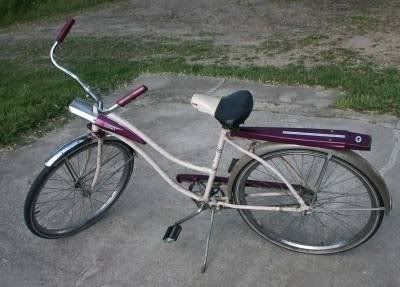
After:

Here are a few pics of an old
bicycle that I fixed up for my brother-in-law:
How to paint a frame when you don't have time to do the job right:
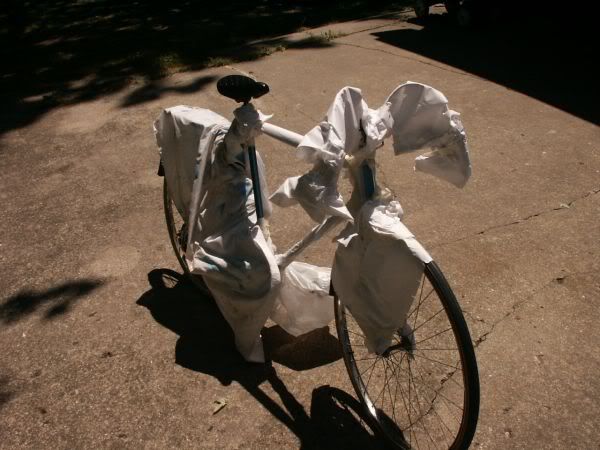
Giving it a name:

Coming:
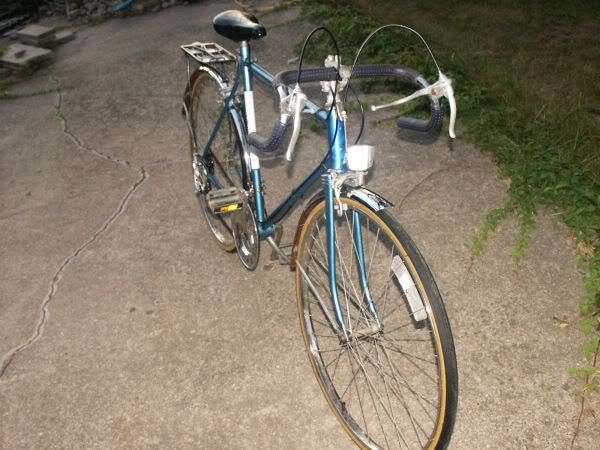
Going:
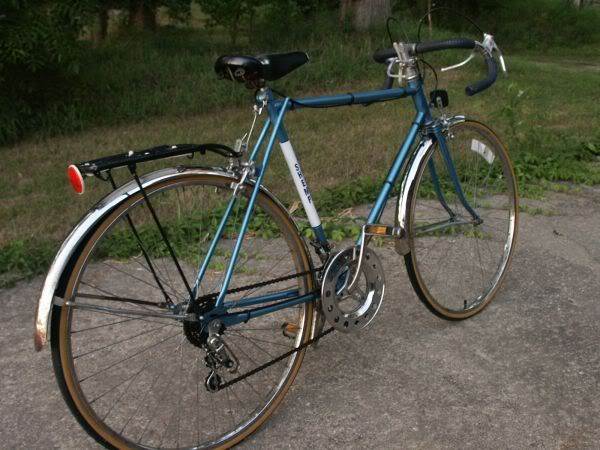
Side View:
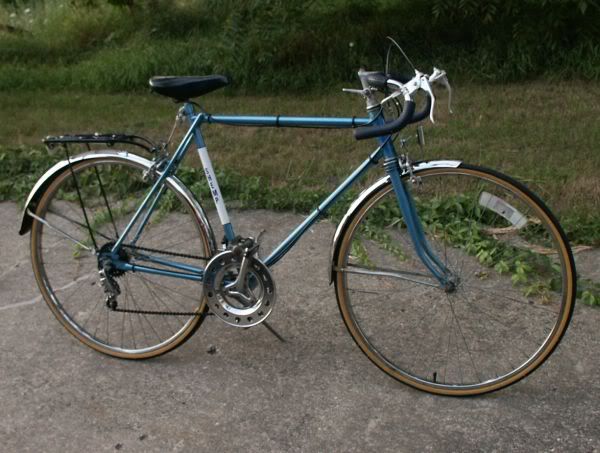
The downside to a
cloud service like Photobucket or Flickr is that you can lose the rights to
your intellectual property by putting your stuff out there for all to see. Yes, there are ways to secure your photos,
but if it’s out there, people can take it.
If you think you've got the next Life Magazine cover photo, you might
want to keep it a little closer to the vest, but for everyday stuff, an online
photo sharing account gives friends, relatives, and potential buyers easy
access to your photos.
*edit* Addendum
After a quick look at my classmates' posts, I realize I did not address the question from the text on page 28, so here are my responses:
Three reasons that would account for lack of performance in a class in this situation would be:
Two strategies that could have been employed are:
*edit* Addendum
After a quick look at my classmates' posts, I realize I did not address the question from the text on page 28, so here are my responses:
Three reasons that would account for lack of performance in a class in this situation would be:
1) Lack of objectives: The teachers as well
as the students need to be aware of what it is they are to accomplish with the
new tools that they are entrusted with. This is shown in the portion of our
chapter that talks about Robert Mager and the early advocates Bobbitt, Charters,
and Burk.
2) Lack of Training: The teachers would
need to be educated in the best ways to use the new tools in class, and the best
methods that work well with different students, allowing individualized pace in
learning.
3) Lack of understanding in the Assessment
process: Tied closely to Objectives, and Training, knowing how to measure the
outcomes. Assessment need not be done strictly at the end of the experiment,
but can be a continuous improvement basis, where the teacher or assessor or both can
make changes to how the tools are used to bring a student back on course to
learn their objectives.
1) Keep the traditional materials and use
them alongside the new computers. This is partially a security blanket , or
magic feather, as people in general are uncomfortable with change. This is also
partially a practical solution to get the class up and learning as you
transition them to the new learning tools. Without a transition, you’re really
throwing the learners—as well as the teacher—into the deep end of the pool in a
sink-or-swim situation.
2) A complete training program that is
instituted first in a pilot program and later in a more widespread manner
providing that assessment shows improvements in student learning. This program
would have to include the three items from the previous portion: Clear
Obtainable Objectives, Comprehensive Training for the teachers prior to teaching
the class, and a clear method to measure results in student learning.
Thursday, February 2, 2012
Social Bookmarking and Instructional Design and Technology
This week our class assignment brought me into the foray of
Social Bookmarking, and the concept of ‘Folksonomy’ otherwise known as “social
tagging”. The idea is to use a site such
as Delicious to store your bookmarks online and then ‘tag’
each bookmark with a set of descriptive terms that you can then use to organize
them for later use based on subject, author, or whatever the ‘tag’ represents
to you. One could draw a Venn diagram to show how
some bookmarks may overlap with others or remain unique via the tags used to
describe them. I’m guessing that is where the
term folksonomy comes from, sort of an undisciplined folk-taxonomy that grows
in an organic sort of way. By using the
tags, you are able to search other websites and resources that have been tagged
with the same terms by other users, and therefore obtain the social portion of
the concept.
I spent quite a bit
of time putting the bookmarks from one of the computers I use into my newly
created delicious account at: http://delicious.com/jameskison and I have to say that the process does
tame the unmanageable pages of bookmarks.
It’s nice to have my bookmarks available on the cloud and organized by
subject. In the past I have used a cloud
book-marking site: mybookmarks , however my account fell into
disuse because I live in a rural location. I did not have access to the internet beyond
a dial-up connection, so the idea was more difficult to use in practice than it was in
theory. I have since forgotten my log in,
and also no longer have the email account that I created the profile with as
that company went out of business. It’s
safe to say that those bookmarks are now lost to me, though in truth I’m not
worried as many of them were to yahoo, angelfire, and xoom.com 'free' personal homepages which
I’m sure the vast majority have gone the way of the dodo. The other downside of that site was the
bookmarks were arranged in folders, not by tags, so cross-referencing or
overlap in organization was not easily accomplished.
I can see Social Bookmarking being valuable to teachers by
facilitating the collaboration amongst peers in terms of sharing
resources. This will be easier in fields
where discipline-specific jargon can be used to tag, as these very specific
terms can cut through the static of a wealth of information. The learned folks on the edge of research
then can review and rank each others resources by adopting them as their own.
The user data can then be analyzed for trends to lead newcomers to the best
materials. One would expect the
students to benefit from teachers who hold a greater knowledge base.
Students could also use the tool to tag and track their own
research amongst a cohort of their classmates.
The teacher could then see amongst the class which resources were
trending in popularity, and perhaps even pick out a few that required a little
extra digging to show the value of persistence to the class.
All of this goodness comes at a price, and I have a concern
that there is an unrealized dark side lurking.
I can’t qualify the uneasy feeling beyond just waiting for the other
shoe to drop. At the heart of my concern
lies this quote: “If you are not paying for it, you are the product”. Google,
Facebook, Amazon and others have quietly been tracking user info for some time
now. Could it be sinister? Well, yes,
but more likely it will result in targeted marketing of goods and services I
actually want. Perhaps that’s not
entirely a bad thing considering the spam I regularly wade through in my inbox. I might even welcome offers that
I’m truly interested in. My bigger
concern is the protection of the students who are in our charge. Beyond the obvious privacy issues of FERPA, I
don’t like the idea of K-12 students being data-mining guinea pigs, and am
distrustful of services that claim to do one thing, but could be subtlety
influencing impressionable minds in the classroom. They get enough of that sort of thing from TV
and internets ads, or simply walking around the mall.
I’m not sure how I fit within the various definitions in
Chapter 1 of the text, but a big part of that is I haven’t really decided on my future path. I have multiple
computer skills and the field of education appeals to my heart. It’s something I can get up in the morning
and feel good about; my life has purpose beyond making the rent. My career direction at the moment is directed
toward supporting and facilitating the educator. That is to say, I’m not interested in being a
traditional classroom teacher, but rather want to be the person behind the
scenes who makes teaching easier and more interesting for the teachers and
students via support technology. The
duties would be anywhere from: reviewing software and hardware solutions, to
installation and repair of equipment, to updating and maintaining the servers
that handle grades and payroll. I have a
feeling that before I’m done, I’ll have a good handle on integrating technology
into the curriculum of the classroom as well.
I’m currently in a higher education setting and love it, but I wouldn’t mind working
in a smaller K-12 environment.
The portion of the text that made the case for Instructional
Design and Technology vs. just Instructional Technology came into play for me on a
personal level this evening as I was talking to my Dad on the phone. It seems that he misheard/misunderstood me a
few months back when I announced that I was going to graduate school, and
thought I had said that my wife was pursuing a Master’s degree. When I explained that it was I who was
attending, he asked what I was studying.
After I answered that I was enrolled in the Educational Technology
program he said “oh, … computers”. Ok,
sure. In a word, I am studying
computers. Sometimes it’s just easier to
let it be. Though to be fair, a couple
of years ago if someone had said the same to me, it would probably have just registered
as ‘computers’.
Subscribe to:
Posts (Atom)